

How to Enroll in E-Statements for Your Members 1st Credit Card
Minute Read

Credit card statement delivery preference can be managed through Members 1st Digital Banking. If you have a Members 1st Visa credit card, you can choose to receive your statements electronically instead of through the mail.
If you are ready to go paperless and just need to know how, we’ve created a simple step by step process for you to follow so that you can enroll today.
Before you get started: Have your Members 1st Online Banking login information handy. You'll also want to make sure the email address associated with your credit card account is current, especially if you plan to receive electronic notifications.
How to Enroll in Credit Card E-Statements
1. Log in to Online Banking Visit Members1st.org and log in using your Online Banking credentials.
2. Select your credit card From the main Accounts page, select the Visa credit card you want to enroll in E-Statements.
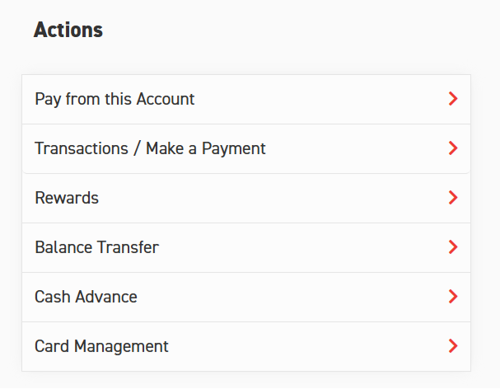
3. Access EZCard Info On your Visa credit card page, select Transactions / Make a Payment. This will take you to EZCard Info, where you can manage your credit card account.
Note: A pop-up will appear letting you know that you are being redirected to a third-party website.
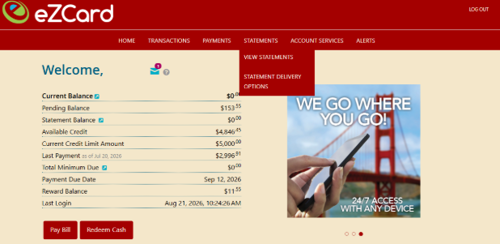
4. Open your statement delivery options Once you're in EZCard Info, select Statements from the top navigation ribbon, then choose Statement Delivery Options.
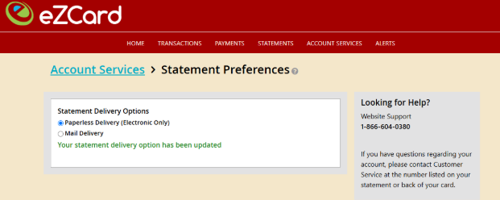
5. Choose paperless delivery On the Statement Preferences page, select Paperless Delivery (Electronic Only).
6. Review and agree to the eSign Disclosure Review the eSign Disclosure and select the checkbox indicating that you agree to the terms.
7. Confirm your selection Select Confirm to complete your enrollment. Your credit card statements will now be delivered electronically.
Looking for ways to get more from your credit card? Check out our tips for using credit cards to your advantage, including how to earn rewards and manage your balance responsibly.
Need to Update Your Email Address?
If you want to receive notifications or other credit card communications at a new email address, you can update your contact information through EZCard Info.
After logging in to digital banking and selecting your Visa credit card, follow these steps:
1. Select Transactions / Make a Payment to access EZCard Info.
2. Select Account Services from the top navigation ribbon.
3. Under My Profile, select Contact Information.
4. Under Notification Preferences, select Add New Email.
5. Enter the email address you want to add and select Add.
6. The new email address will appear as Pending Validation.
7. Check the inbox of the new email address you added for a verification email and follow the instructions to verify the address.
8. Once verified, the email address will display as Confirmed.
Tip: Be sure you have completed the verification step for your new email address before relying on it for credit card notifications.
Want to Go Back to Paper Statements?
You can change your statement delivery preference at any time. If you decide you would rather receive your credit card statements by mail, follow these steps:
1. Log in to Members1st.org using your Online Banking credentials.
2. From the Accounts page, select the Visa credit card you want to update.
3. Select Transactions / Make a Payment to access EZCard Info.
4. Select Statements from the top navigation ribbon, then choose Statement Delivery Options.
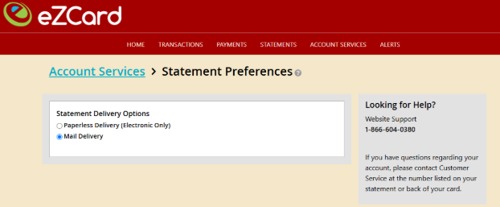
5. On the Statement Preferences page, select Mail Delivery.
6. A pop-up will appear, asking you to confirm your selection. Select Confirm to complete the change.
Manage Your Statements Your Way
Whether you prefer the convenience of paperless statements or want to continue receiving statements by mail, you can manage your credit card statement delivery preferences anytime through our digital banking platforms.
If you choose E-Statements, remember to keep your email address up to date so you don't miss important notifications about your account.
Ready to simplify your credit card management? Log in to Online Banking to enroll in E-Statements, or explore Members 1st Visa credit card options to learn more about our cards and their features.
Federally Insured by NCUA.
